Phishing Defense: Why Awareness Training Is Not Enough (And What to Do Instead)
(Updated: )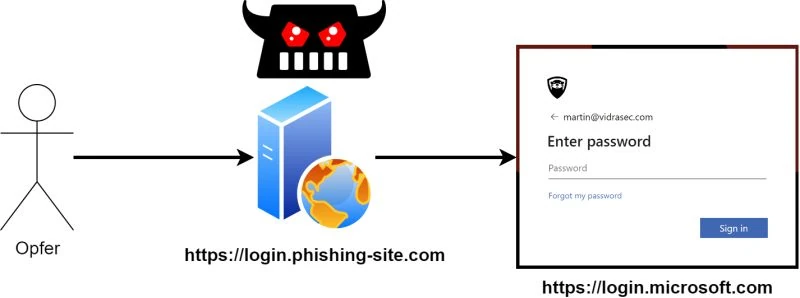
Diese Seite ist auch auf Deutsch verfügbar.
Security awareness training is valuable. Recognizing suspicious emails, questioning unexpected login requests, and knowing what phishing looks like: all of that makes attacks harder.
But here’s the honest truth: with enough effort, anyone can be phished. I run simulated phishing campaigns for clients regularly as part of Cyber Attack Simulation engagements, and I have never failed to catch at least a few users, no matter how good their training is.
Awareness reduces the attack surface. It does not eliminate it. If your entire phishing defense strategy rests on hoping employees make the right call every single time, you have a strategy built on optimism rather than security.
This post covers what modern phishing attacks look like, why the most common technical control (MFA) does not work the way most people think, and which measures actually stop attackers even when a user makes a mistake.
Modern Phishing Is Not What Awareness Training Prepares You For
Classic phishing awareness teaches people to look for:
- Suspicious sender addresses
- Urgent language and pressure tactics
- Links to unusual domains
- Requests to enter credentials
That’s useful. A CEO fraud email from a Gmail address is easy to spot once you know to look. But attackers adapt, and the sophisticated attacks being used against organizations today look nothing like the training examples.
The Proxy Attack: Stealing Sessions, Not Passwords
The most effective phishing technique today doesn’t steal your password. It steals your authenticated session.
Here’s how it works: the attacker sets up a proxy website that sits between the victim and the legitimate login page. The victim genuinely communicates with the real service (Microsoft 365, a corporate VPN, a cloud platform) but every request passes through the attacker’s proxy. After the victim completes authentication, the proxy captures the session token.
The attacker now has a valid session. No credential theft, no brute force. The session token works just like being logged in.
This completely bypasses passwords and most forms of MFA. The victim entered their correct password and their correct one-time code. The real server accepted everything. The attacker just read the traffic.
Device Code Phishing: A Legitimate URL Is No Longer Safe
Device code phishing abuses a legitimate authentication flow originally designed for devices that can’t easily handle browser logins (smart TVs, CLI tools, and similar scenarios).
The victim receives a message: “Please go to microsoft.com/devicelogin and enter this code.” The URL is real. The site is genuinely Microsoft’s. The user enters the code and completes a normal login. What they don’t realize is that the attacker initiated the device authentication request and is waiting on the other side to receive the session.
Because the domain is legitimate and the interaction looks normal, this attack slips past both user awareness and many automated email filters. Conditional Access policies that rely on the login being suspicious also fail here: the login itself is legitimate, just initiated by an attacker.
Social Engineering at Scale: The Long Con
Some attacks invest weeks in building trust before attempting anything. Pig butchering scams (originally targeting personal finance) work by establishing genuine-seeming relationships through social media, often using cloned accounts of real people with legitimate-looking follower counts and post histories.
The attacker monitors who follows a target account and creates a near-identical profile. After building rapport over days or weeks, the payload arrives: a link, a login request, a code to enter somewhere. By then, the victim has no reason to be suspicious.
This level of sophistication renders awareness training nearly irrelevant. The user is doing everything right: they’re communicating with someone they believe they know, on a platform they trust.
The MFA Myth You Need to Stop Repeating
“Enable MFA to protect against phishing.”
This statement is repeated constantly, including by people who should know better. It is not accurate for most MFA implementations.
MFA (two-factor authentication, TOTP codes, SMS codes, push notifications) protects against credential stuffing: an attacker who obtained your password through a data breach or guessing, and is trying to log in without being present.
It does not protect against the proxy attack described above. In that scenario, the victim provides their password and their MFA code to the legitimate service, through the attacker’s proxy. Both factors are provided correctly. The session token the server issues is the thing that gets stolen, and that token is already authenticated.
What Actually Stops Phishing: Phishing-Resistant MFA
There is a category of authentication methods that are genuinely resistant to this attack: FIDO2 hardware tokens and passkeys.
The mechanism that makes them resistant: these methods cryptographically bind the authentication to the exact origin domain. The FIDO2 token or passkey will only respond to authentication requests from the legitimate domain. It does not matter that the victim can’t tell the difference between login.microsoft.com and login.micros0ft-secure.com. The hardware can, and it refuses.
The proxy attack fails because the attacker’s proxy site is not the legitimate domain, and the authenticator will not complete the challenge.
If you want to tell your users that enabling MFA protects them against phishing: make sure it’s FIDO2 or passkeys. SMS codes, authenticator app TOTP, and push notifications don’t deliver that protection.
Technical Controls That Work When Users Don’t
Since we’ve established that user decisions can’t be the last line of defense, here are the technical measures that stop attacks even after credentials or session tokens are compromised.
Conditional Access: Require Managed Devices
Microsoft Entra ID (formerly Azure AD) includes Conditional Access, a policy engine that controls who can log in, from where, and under what conditions. An EntraID Audit will surface whether your Conditional Access policies are actually configured to provide this protection, or just appear to.
The most effective configuration for stopping credential-based attacks: restrict login to managed (company-registered) devices only.
Here’s why this is powerful: even if an attacker has stolen valid credentials, a correct MFA code, and a valid session token, they are logging in from their own device. That device is not registered in your tenant as a trusted device. Conditional Access blocks the login.
To make this work:
- Configure Conditional Access to require a compliant or Entra-joined device for all authentication.
- Restrict new device registration to internal network access only.
The second step is critical. It means an attacker cannot simply register their own device remotely. They’d need to already be inside the internal network, and if that’s the case, you have bigger problems than Conditional Access can solve.
Additional Conditional Access policies worth configuring:
- Geographic restrictions (block logins from countries you don’t operate in)
- Risk-based sign-in policies (flag logins with unusual patterns)
- Session frequency requirements (force re-authentication after a defined period)
Outlook’s Built-In Report Button
If you use Microsoft 365, you already have a phishing reporting tool deployed. Most organizations just haven’t configured it to be useful.
The “Report” button in Outlook defaults to sending suspicious emails to Microsoft for analysis. That helps Microsoft improve their filters. It doesn’t help your security team.
What most admins don’t realize: you can configure the destination. Set the reported messages to forward to an internal security mailbox, and suddenly your Blue Team has real-time visibility into what’s hitting inboxes. Actual attack emails, user-reported, arriving in a central queue.
A simple configuration change. The impact, when implemented well, can be dramatic: organizations that have added a clearly labeled phishing report button with proper internal routing have seen phishing report rates increase by an order of magnitude. Reporting friction is the reason most suspicious emails go unreported. Reduce the friction, and you get the data.
Putting It Together: A Layered Defense
No single measure here is a silver bullet. The value is in combining them:
| Layer | What it does | What it doesn’t do |
|---|---|---|
| Awareness training | Reduces susceptibility to obvious attacks | Fails against sophisticated, targeted attacks |
| Standard MFA | Blocks credential stuffing | Does not stop proxy phishing or device code phishing |
| Phishing-resistant MFA (FIDO2/Passkeys) | Stops proxy phishing | Requires hardware investment and enrollment |
| Conditional Access (managed devices) | Blocks stolen credentials from unmanaged devices | Requires device management infrastructure |
| Configured Report button | Gives Blue Team visibility into live campaigns | Requires user participation |
The goal is that each layer compensates for the failure modes of the others. If a user clicks a link and enters their credentials on a proxy site, Conditional Access should prevent login from the attacker’s unmanaged device. If a phishing campaign is circulating, the Report button should get it into your security team’s queue before the entire organization has seen it.
Awareness training remains the right starting point. Your users noticing something suspicious and not clicking is always the best outcome. But building security policy on the assumption that they’ll always make the right choice is not a strategy. It’s a wish.
Quick-Start Checklist
If you’re not sure where to begin, these are the highest-value actions:
- Audit your MFA methods: are any of them phishing-resistant (FIDO2/Passkeys)?
- Review your Conditional Access policies: is device compliance enforced for M365 access?
- Configure the Outlook Report button to forward to an internal security mailbox
- Add geographic and risk-based Conditional Access rules if not already in place
- Review device registration policies: can external devices be registered without network access?
Each of these can be implemented without new tooling if you’re already on Microsoft 365. The infrastructure is there. It just needs to be turned on and configured properly. A Microsoft 365 Audit reviews exactly these settings, among others.
Want to know how your organization holds up against a real phishing campaign? Get in touch.
Related Services
Book appointment | martin@vidrasec.com | +43 670 3081275 | +43 670 3081275 (opens in a new tab) |